
Home Download Pricing FAQ Manual Tutorials Known issues News
- What types of EMF files are generated?
- Can the driver handle portrait and landscape in the same document?
- Does generated EMF image file contain printed graphics objects?
- What programming tools are needed to build drivers from a source code?
- What programming tools are needed to build your own MSI-package?
- Does EMF driver support different color modes?
- Can the printer be used to print from the Terminal Services session or Remote Desktop connection?
- I found an error in the generated PDF document. What should I do?
- Do we need Adobe Acrobat or 3rd party software for creating a PDF with an EMF virtual printer?
- How can we integrate an EMF virtual printer with our client application? Do you have samples?
- How to share a virtual printer?
- How can I install a virtual printer silently?
- How can I specify installation directory for msi-package?
- How can I change temporary folder for a virtual printer?
- How can I uninstall a virtual printer?
- Can I install two or more virtual printers on a single server?
- How to test your software? Where can I download it?
- What are the limitations of the demo version?
- We need the ability to open our software when printing to the virtual printer and thus displaying the printed document in our program.
- How to turn off spool file pooling?
- Have you ever ventured into Bluetooth Printing Profiles that iPad/Android tablet POS systems use to print receipts?
- Would you be interested in working on an iOS/Android based driver that would stream receipt printing data to other devices?
- How many print jobs can manage the Virtual Printer Driver?
- How do I check the watermark display?
- When using ESC/POS printing, the following message is displayed in the document: “Incorrect command set or text encoding”.
- How do I increase the font of the ESC/POS receipt?
- Can ESC/POS receipt parser output a Chinese character, for example: 金 ?
- Is it possible to set for the Virtual Printer an icon that will be displayed in the Windows system menu?
- How to print a spool file with SPL extension to the Virtual Printer?
- How to set general print options for the Virtual Printer?
- How to check which paper sizes are set to be used by the Virtual Printer Driver?
- How to test the Virtual Printer with custom paper sizes?
- When printing to “Two Pilots Demo Printer”, I don’t find a possibility to specify paper orientation / print resolution / print mode / paper size. Why?
- How to print multiple .TXT files on paper in a certain format without setting the paper size every time?
- How to set paper size when printing from a POS application to the Virtual Printer?
- How to set paper orientation for the Virtual Printer?
- When printing a document, the wrong paper size is selected. How to fix it?
- In which cases the default paper size is used by the Virtual Printer?
- How are permissions assigned to the output directory?
- How to assign file output to a user folder?
- What is the purpose of the [Extra] section of the ini-file?
- How are print jobs from multiple users being processed?
- How to disable the “Job-file content” window?
- How to run the program installer so that a log file is generated?
- I cannot open the installer project with Microsoft Visual Studio 2015.
- How to setup printing over the network?
- Why I can not search text through the resulting PDF documents?
- Will Virtual Printer Driver work if we install it on Citrix server and try to use from our local PC?
- What is the mechanism of creating EMF files in Virtual Printer Driver?
-
What types of EMF files are generated?
Generated EMF is operating system specific: EMF 1.0 in Win9x, NT EMF 1.003 in NT4, NT EMF 1.008 in Win2k/XP. Generated EMF files are intended for local converting/viewing only, not for using on another computers because they contain environment-specific fonts and graphics. To preserve fonts and graphics, you can use PDF format as your output file format. PDF is supported by our virtual printer technology as well.
-
Can the driver handle portrait and landscape in the same document?
Yes. Client application can get information about document orientation, resolution and title from the virtual driver.
-
Does generated EMF image file contain printed graphics objects?
Yes. Such objects are embedded in EMF in the device-independent format with color information provided by the source application.
-
What programming tools are needed to build drivers from a source code?
Software requirements:
- MSVS 2013, 2015
- WDK 7600
- WiX Toolset
- NSIS
- InnoSetup
-
What programming tools are needed to build your own MSI-package?
WiX toolset http://wixtoolset.org
-
Does EMF driver support different color modes?
EMF is independent from display color modes. All embedded graphics are stored in the device-independent format. All necessary color transformations must be performed by the client application.
-
Can the printer be used for printing from the Terminal Services session or Remote Desktop connection?
The virtual printer is compatible with Terminal Services and Remote Desktop Connection.
-
I found an error in the generated PDF document. What should I do?
Please send us the generated PDF file, its source EMF file and the original document (if possible). We will fix the bug as soon as possible.
-
Do we need Adobe Acrobat or 3rd party software for creating a PDF with an EMF virtual printer?
No, you don’t. We use our own library, PDF Creator Pilot, for creating PDF files.
-
How can we integrate an EMF virtual printer with our client application? Do you have samples?
Integration of your application with a virtual printer is an easy process. We have several samples. The full package, which you will receive after buying the printer, includes the samples as well.
-
How to share a virtual printer?
When you share the printer on Windows Vista and later you need to uncheck “Render print jobs on client computers” at the ‘Sharing’ tab of printer properties dialog.
When you share the printer on XP, use the following procedure to enable the “Always render print jobs on the server group policy on each client machine”:
1. From the Start menu, select Run (on Windows Vista Run can be found in the Accessories menu) and type gpedit.msc;
2. In the group policy object editor, open Computer Configuration, then Administrative Templates, and then Printers;
3. Select Always render print jobs on the server and click Enabled;
4. Make print spooler service restart.
-
How can I install a virtual printer silently?
You can install MSI-package with using “msiexec” tool with “/quiet” key “msiexec /i product.msi /quiet”. Also you should have an administrator privilege rights.
-
How can I specify installation directory for msi-package?
You can set an “INSTALLFOLDER” property for “msiexec” tool “msiexec /i product.msi INSTALLFOLDER=path_to_install”.
-
How can I change temporary folder for a virtual printer?
By default the virtual printer uses User temporary directory from “TEMP” or “TMP” environment variables for temporary files. You can change this behaviour by setting “VPD_TEMP” environment variable to a required temporary directory.
-
How can I uninstall a virtual printer?
You can uninstall the virtual printer via “Start” or “Programs and Features” menu. If you have an error during the uninstallation process you can try to uninstall it with using “Fixit” tool from Microsoft http://support.microsoft.com/mats/Program_Install_and_Uninstall.
-
Can I install two or more virtual printers on a single server?
Yes, you can if they have a different names.
-
What are the limitations of the demo version?
The demo version places notification messages inside the generated documents.
-
We need the ability to open our software when printing to the virtual printer and thus displaying the printed document in our program. Does the EMF virtual printer have any feature that makes it possible to launch an .exe following the virtual printer receiving a print job?
Yes, you should specify your application in printer properties tool (“Application” tab) or setup it via registry settings directly “{HKLM, HKCU}\Software\Two Pilots Demo Printer\Application\Postconverter”. For more information please check here.
-
How to turn off spool file pooling?
On Windows NT/2000, find the files by name xxxxx.spl where xxxxx was the JobID returned by the EnumJobs API.
However, XP and 2003 create spool files named FPnnnnn.spl where nnnnn is no longer the JobID.
This is the side effect of file pooling. You can “turn off” Spool File Pooling by keeping printed jobs or specify a different spool directory. The workaround to this is as below:
To Turn Off Spool File Pooling on a Per Printer Queue-basis:
1. Click “Start”, click “Run”, type “regedit” in the “Open” box, and then click “OK”.
2. Locate the following registry subkey, where <printername> is the name of your printer:
HKEY_LOCAL_MACHINE\SOFTWARE\Microsoft\Windows NT\CurrentVersion\Print\Printers\<printername>
3. In the right pane, right-click “SpoolDirectory”, and then click “Modify”.
4. In the “Value data” box, type the location where you want the spool files to be stored. For example, type c:\windows\system32\spool\printers as the default location.
5. Quit Registry Editor.
6. Restart the “Print Spooler” service.All new jobs will be of the form XXXXX.SPL and XXXXX.SHD and will be numbered consistently with their JobIDs.
To Turn Off Spool File Pooling for All Printers:
(Note: This method only works on Windows 2003 Server. This method does not work for Windows XP.)
1. Click “Start”, click “Run”, type “regedit” in the “Open box”, and then click “OK”.
2. Locate the following registry subkey: HKEY_LOCAL_MACHINE\System\CurrentControlSet\Control\Print
3. On the “Edit” menu, point to “New”, and then click “DWORD Value”.
4. In the “New Value #1” box, type “DisableServerFilePooling”, and then press “ENTER”.
5. Right-click “DisableServerFilePooling”, and then click “Modify”.
6. In the Value data box, type 1 to turn off spool file pooling, and then click “OK”.
7. Quit Registry Editor.
8. Restart the “Print Spooler” service.All new jobs will be of the form XXXXX.SPL and XXXXX.SHD and will be numbered consistently with their JobIDs.
-
Have you ever ventured into Bluetooth Printing Profiles that iPad/Android tablet POS systems use to print receipts?
We have not yet tested the operation of a virtual printer with Bluetooth, POS systems for iPad/Android tablets.
-
Would you be interested in working on an iOS/Android based driver that would stream receipt printing data to other devices?
The solution of such tasks is not planned yet.
-
How many print jobs can manage the Virtual Printer Driver?
We have tested the operation on 200 print jobs. However, a large number of print jobs requires the operating system to allocate a large amount of space. A lack of memory can cause slowdowns and program crashes. Therefore, when performing such tasks, it is desirable that a sufficient amount of RAM is installed.
-
How do I check the watermark display?
To enable watermark display, set:
HKEY_LOCAL_MACHINE\SOFTWARE\Two Pilots Demo Printer\Converter\Watermarks\Enabled = 1
Using registry settings, you can add several different watermarks. For each watermark, a subkey is added to the registry. For example, installing Two Pilots Demo Printer adds two keys to the registry, one for demonstrating the creation of a Wt text watermark, and one for a WI picture watermark. These parameters are recorded in the registry Watermarks\WI and Watermarks\Wt accordingly.
To display an image, specify the full path to it in the registry parameter: Watermarks\WI\Image path.
-
When using ESC/POS printing, the following message is displayed in the document: “Incorrect command set or text encoding”. How to fix it?
This message is displayed if an incorrect character encoding is set. Most often POS printers use ASCII encoding, so it is specified by default.
This value is written in the registry key:
HKEY_LOCAL_MACHINE\SOFTWARE\Two Pilots Demo Printer\Converter\POS\Encoding = ASCII
This encoding cannot display all the variety of Chinese characters. Therefore, you should find out in what encoding your application generates a print job. Set the desired value of the Encoding parameter in the registry.
Suppose your text is written in UFT-8 encoding. The following value must be entered in the registry key:
HKEY_LOCAL_MACHINE\SOFTWARE\Two Pilots Demo Printer\Converter\POS\Encoding = UTF-8
-
How do I increase the font of the ESC/POS receipt?
The ESC/POS receipt parser parameters are set using the registry. To increase the font, you can use the following values:
HKEY_LOCAL_MACHINE\SOFTWARE\Two Pilots Demo Printer\Converter\POS\FontA Size = 8
HKEY_LOCAL_MACHINE\SOFTWARE\Two Pilots Demo Printer\Converter\POS\FontB Size = 10
Read more about the POS parameters in the Manual.
-
Can ESC/POS receipt parser output a Chinese character, for example: 金 ?
First of all, you need to determine the encoding that is used in the print job file. You can enable the creation of a raw file by setting the Enabled = 1 parameter in the registry:
HKEY_LOCAL_MACHINE\SOFTWARE\Two Pilots Demo Printer\Converter\RAWWith the help of hex editor, you can find out that in the raw file, the symbol 金 has the code BDF0.
To determine the name of the encoding, you can use the website:
https://www.haomeili.net/Code/DetailCodes?wd=%E9%87%91
The website shows that the symbol 金 corresponds to the symbol BDF0 in GB2312 encoding.To configure the encoding, set the parameter in the registry:
HKEY_LOCAL_MACHINE\SOFTWARE\Two Pilots Demo Printer\Converter\POS\Encoding = GB2312In addition, you need to specify the font that contains this character:
HKEY_LOCAL_MACHINE\SOFTWARE\Two Pilots Demo Printer\Converter\POS\FontA = Microsoft YaHeiHKEY_LOCAL_MACHINE\SOFTWARE\Two Pilots Demo Printer\Converter\POS\FontB = Microsoft YaHei
-
Is it possible to set for the Virtual Printer an icon that will be displayed in the Windows system menu?
In the current version of Virtual Printer Driver, it is not possible to set the printer icon for the Windows system menu. This feature is included in the development plan.
-
How to print a spool file with SPL extension to the Virtual Printer?
First of all, you need to assign a shared resource name to the printer. To do this, you need to open the printer properties. On the Sharing tab, assign a Share name.
Below is a screenshot for an example of Two Pilots Demo Printer:
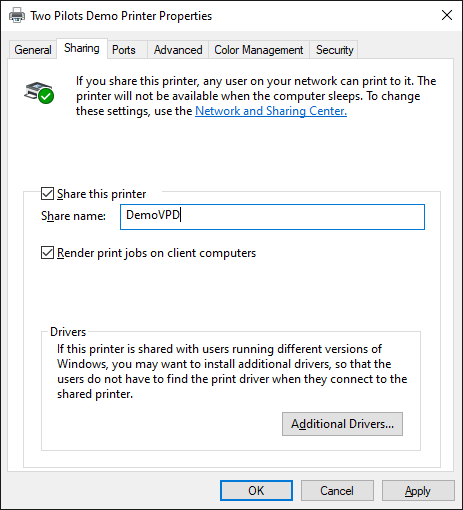
After that, you will be able to send SPL files to print using the command:
copy 00019.SPL \\NamePC\DemoVPD
Where:
00019.SPL – the file name;
NamePC – the name of your computer on the network;
DemoVPD – share name of the printer.
-
How to set general print options for the Virtual Printer?
You can set general print options using the program:
C:\Program Files\Two Pilots Demo Printer\properties.exePlease note that when printing from any application to “Two Pilots Demo Printer”, the printer will use document properties (paper orientation, print resolution, print mode and paper size) specified in the application.
-
How to check which paper sizes are set to be used by the Virtual Printer Driver?
Paper formats can be viewed using the utility:
C:\Windows\System32\printmanagement.mscor by running the program:
C:\Program Files\Two Pilots Demo Printer\properties.exePlease note that when printing from any application to “Two Pilots Demo Printer”, the printer will use paper size specified in the application.
-
How to test the Virtual Printer with custom paper sizes?
To ensure seamless integration and functionality of your Virtual Printer Driver SDK, thorough testing is essential. While various applications can be used for testing, Microsoft Word and Notepad are recommended due to their widespread use and compatibility. Click here for a step-by-step guide to testing printing in different formats, including custom paper sizes.
-
When printing to “Two Pilots Demo Printer”, I don’t find a possibility to specify paper orientation / print resolution / print mode / paper size. Why?
If you print from such applications as MS Word or MS Excel to the Virtual Printer, the printer will use document properties (paper orientation, print resolution, print mode and paper size) specified in the application. Therefore, if you select “Two Pilots Demo Printer” in the print dialog of your application, the printer Properties window will not contain “Paper Size” tab.
You can check general print options using the program:
C:\Program Files\Two Pilots Demo Printer\properties.exeThis window will contain “Paper Size” tab.
-
How to print multiple .TXT files on paper in a certain format without setting the paper size every time?
A simple text document does not contain information about paper format. Let us say, you want to print multiple text files from Microsoft Notepad to “Two Pilots Demo Printer” in A5 paper size.
- Set “Two Pilots Demo Printer” as default (in the system printer settings).
- Run the program: C:\Program Files\Two Pilots Demo Printer\properties.exe and set paper format on the “Paper size” tab.
- Open a text file in Microsoft Notepad. Now, if you select File -> Page Size, you will see that the application automatically determined the paper size you set up.
- Select File -> Print to print the document.
-
How to set paper size when printing from a POS application to the Virtual Printer?
- In your system printer settings, set “Two Pilots Demo Printer” as default.
- Run the program: C:\Program Files\Two Pilots Demo Printer\properties.exe and set paper format on the tab “Paper size”.
- Open your file in your POS application. Select the Print command to print the document.
-
How to set paper orientation for the Virtual Printer?
You can set general print options using the program:
C:\Program Files\Two Pilots Demo Printer\properties.exeTo set paper orientation, go to the General tab.
The paper size is determined at the stage of creating a print job in the printing application using the corresponding Windows functions. The Virtual Printer displays the paper orientation as it is set in the printing application.
Usually, printing applications have their own window for setting the paper orientation. Some applications read the default paper orientation from the settings of the selected printer and offer the user to make a choice. Other applications force the orientation of the paper and do not provide a possibility to change it.
-
When printing a document, the wrong paper size is selected. How to fix it?
- Run the program: C:\Program Files\Two Pilots Demo Printer\properties.exe
- On the “Paper size” tab, click “Add”.
- In the opened dialog box, enter Form name and set paper size. Click Ok.
The new paper format will be added to the list. Now, when your printing application generates a print job, it searches for a suitable form in this list.
-
In which cases the default paper size is used by the Virtual Printer?
Most often, when printing from any application to “Two Pilots Demo Printer”, the printer will use paper size specified in the application. For example, you set paper size of the document when you edit it in MS Word. When you print this document, the default paper size of the Virtual Printer will not be used.
You might want to set default paper size when printing a simple text document that does not contain information about paper format, or when printing from a POS application.
-
How are permissions assigned to the output directory?
The msi_installer folder of your project contains an example of the installation program. You can view and edit the file:
msi_installer\VPDInstaller\Product.wxs
When the distribution is running, the output directory is created with the necessary permissions.
Pay attention to the piece of code starting at line 109:
<!-- output dir -->
<Directory Id="OUTPUTFOLDER" Name="Output"/>
and starting at line 162:<Fragment> <DirectoryRef Id="OUTPUTFOLDER"> <Component Id="CreateOutputDir" Guid="{002F39DF-3C85-4108-8BFC-5586AEDF1D91}" KeyPath="yes"> <CreateFolder> <util:PermissionEx User="Users" GenericWrite="yes"/> </CreateFolder> <RemoveFile Id="CleanupOutputDir" Name="*.*" On="uninstall"/> </Component> </DirectoryRef> </Fragment>
-
How to assign file output to a user folder?
If your program has user rights, create a folder named: C:\Users\User\Output
where “User” is the name of the user.
Use the key in the registry to assign this folder to output Virtual Printer Driver files:
\HKEY_CURRENT_USER\Software\Two Pilots Demo Printer\Converter
Output Directory = C:\Users\User\OutputAlternatively, you can run the program:
C:\Program Files\Two Pilots Demo Printer\properties.exeand set the path on the “Converter” tab.
Then your program will be able to read and delete files in this folder.
-
What is the purpose of the [Extra] section of the ini-file that is generated in the Output folder after printing to the Virtual Printer?
The [Extra] section contains information about the document page parameters. For the simplest case (for example, if you print from Notepad), all the pages of the document are the same. Then their parameters are specified in the [Document] section, and the [Extra] section is missing.
If you print from more complex applications, such as MS Word, then a generated print job can contain multiple pages with different parameters. For example, the first page can be portrait, and starting from the third page it can be landscape. Then the [Extra] section will look like:
[Extra]
Page1_HorizontalResolution=300
Page1_VerticalResolution=300
Page1_Orientation=1
Page1_PaperSize=11
Page1_PaperSizeName=A5
Page1_PaperWidth=1480
Page1_PaperLength=2100
Page1_Bin=15
Page3_HorizontalResolution=300
Page3_VerticalResolution=300
Page3_Orientation=2
Page3_PaperSize=11
Page3_PaperSizeName=A5
Page3_PaperWidth=2100 Page3_PaperLength=1480
Page3_Bin=15
-
How are print jobs from multiple users being processed?
Virtual Printer Driver can handle tasks for multiple users with different settings. For this purpose, the following parameters are written to the output ini-file: UserName; NotifyName; SecurityID.
The print job parameters are passed to the Virtual Printer Driver as a structure JOB_INFO_2:
https://docs.microsoft.com/en-us/windows/win32/printdocs/job-info-2This document contains a description of the pNotifyName parameter:
A pointer to a null-terminated string that specifies the name of the user who should be notified when the job has been printed or when an error occurs while printing the job.
In order to understand the purpose of the SecurityID parameter, open the Registry Editor and locate the HKEY_USERS key. Then find the key with the name of the SecurityID parameter value from the ini file. You will see the settings of the user who created the print job.
Thus, the Virtual Printer Driver determines the settings for processing the corresponding job.
Settings for each user can be set with Administrator rights in the registry:
HKEY_USERS\{SecurityID}\Software\Two Pilots Demo Printer\The SecurityID values for each user are output to the print ini file.
-
How to disable the “Job-file content” window?
To disable the “Job-file content” window, you need to:
1. Run the program:
C:\Program Files\Two Pilots Demo Printer\properties.exe2. Select the “Application” tab;
3. Uncheck the “Enable application” option.
In fact, selecting this option runs the demo program SampleClient.exe. Instead, you can run your own program to process the resulting files.
-
How to run the program installer so that a log file is generated?
Go to the folder with the installation file and run the following command from the current folder without specifying the path to the file:
msiexec /quiet /i VPDInstaller.x64.msi /l*v .\log.txt
-
I cannot open the installer project with Microsoft Visual Studio 2015.
To make it possible, you need to install “Wix Toolset”. Please see the following documentation page for more information: https://www.colorpilot.com/vpd2.html#16BuildingMSIpackage
-
How to setup printing over the network?
When printing over the network, a job in the queue is generated from a user with Guest rights. If Windows does not have a user account with Guest rights, then you need to create one. After that, you need to log in to this account and check print. Then check the print over the network.
-
Why I can not search text through the resulting PDF documents?
Typically, printing applications such as MS Word and Notepad output text with text output commands. In this case, the print job contains text and the output PDF file will contain text.
Different programs print PDF files in different ways. For example, if you print a PDF document from Google Chrome, the browser will draw individual words as bitmaps and output them as pictures. Adobe Acrobat Reader has a large number of printing settings. However, in some cases, regardless of the settings, it will also output text as bitmaps. Unfortunately, in these cases, the virtual printer cannot return text. We recommend using FireFox browser, as it prints text as text.
-
Will Virtual Printer Driver work if we install it on Citrix server and try to use from our local PC?
We have not checked the operation of the Virtual Printer Driver on Citrix. We think that the setup is complicated and it is necessary to have the experience of a system administrator.
Note that when printing over the network, a job is generated in the queue from a user with Guest rights. If Windows does not have a user account with Guest rights, then you need to create one. After that, you need to log in to this account and check the print. Then check the print over the network.
-
What is the mechanism of creating EMF files in Virtual Printer Driver?
There are two primary types of print jobs handled by our Virtual Printer Driver: EMF and ESC/POS. Read more…
Home Download Pricing FAQ Manual Tutorials Known issues News