
Exif Pilot & Batch Editing Plug-in
- I am unable to select multiple files to edit EXIF.
- Am I degrading the jpeg each time I edit and save using Exif Pilot?
- Will the “add to current time” option change only the time regardless of the date, or will it realize the transition past 12:00 midnight and also change the date?
- When I type “exifpilot.exe c:\Pictures Exif/Photo/FNumber 48/10” on the command line, the EXIF data changes successfully. However, the Exif Pilot window doesn’t open. Why not?
- May I change one tag in the several images at the same time using Exif Pilot?
- How may I edit the F Number and Focal Length?
- Please explain how “Date-Time” is different from “Date Original” and “Date Digitized”.
- What is the difference between an EXIF date and a file date?
- Is it possible to copy values from one tag to another?
- How do I create a <keywords> tag in IPTC data?
- How to Export EXIF and IPTC data to MS Excel file with Exif Pilot?(At the level of Tag-Names in the table)
- Is there any way to get the Orientation field to appear on the report in the file list report in the center pane? Right now that report only shows Filename, FocalLength, ExposureTime, etc.
- I want a report by tags that allows us to quickly spot which files need updating. Does your batch program do that?
- I have 5 000 photos that have no geolocation, but in Excel I have the coordinates of where each photo was taken. Can your software batch update exif data of the 5 000 photos to add GPS location?
- When I try to export several tags into an Excel file, all the tags will export. What is wrong?
- I am trying to edit the EXIF GPS. The actual latitude and longitude are: 38.106608, -82.272184. I choose the right references (north and west) and edit the EXIF GPS data. But at the end I get a totally different location.
- How to refresh a file folder in order to see new files that have been saved at that location?
- How do I install a new version of Exif Pilot without losing my settings?
- Will your Batch Editing Plug-in allow me to transfer all the information from my TEXT file to my 12,000 JPG images in a batch mode?
- I have a .xls file with tags, can I import them to the image(s) using Exif Pilot?
- When I export metatags of my >1000 images to MS Excel, I get a separate spreadsheet for each photo. I want one sigle spreadsheet for all photos.
- When importing/exporting, the caption (which is really long) is being truncated / cut off.
- The option to Export/Import to/from a single file is greyed out. How can I export exif data from multiple images to a single spreadsheet?
- Is it possible for Exif Pilot to recognize the metadata I entered in Windows File Explorer? E.g. “Title”, “Comments, “Subject”…
- Is it true that EXIF metadata is removed if I send a photo over email (e.g. Gmail) or any social media messenger?
- I open a folder that contains over 2000 images. After 15 minutes, Exif Pilot has still not read all files names. How can I speed up the process?
- I am trying to export EXIF data to MS Excel, I get a dialog box saying “Processing” and nothing happens.
- Will the program work without an always-on internet connection?
-
I am unable to select multiple files to edit EXIF.
To be able to select multiple files and batch process EXIF data, you need to buy Batch Editing Plug-in.
-
Am I degrading the jpeg each time I edit and save using Exif Pilot?
No, jpeg images are not degraded after editing and saving EXIF info with Exif Pilot.
-
Will the “add to current time” option change only the time regardless of the date, or will it realize the transition past 12:00 midnight and also change the date?
The program will realize the transition past 12:00 midnight and also change the date.
-
When I type “exifpilot.exe c:\Pictures Exif/Photo/FNumber 48/10” on the command line, the EXIF data changes successfully. However, the Exif Pilot window doesn’t open. Why not?
The Exif Pilot window will open, if you type only “exifpilot.exe” on the command line. Your example shows an advantage of using the command line. You can change tags in the images without opening the program.
-
May I change one tag in the several images at the same time using Exif Pilot?
a) If all the tags in all the images that you want to change are the same, then you may change them all at the same time using the “Edit EXIF Data” option.
b) If some tags are the same but others are different, you must first remove those that are different. Export a file to MS Excel, delete all tags except the tag(s) which you need to change. Then choose the appropriate files in Exif Pilot and import the changed file(s) from MS Excel and change the tags in all the files.
-
How may I edit the F Number and Focal Length?
The F Number and Focal Length tags are defined with the fractional type. Fractional type tags can contain only fractional numbers in the form a/b, so the parameter value must be in a/b format.
If you want to set a new value of 4.8, you need to convert it from decimal format. For example, 4.8 = 48/10 or 0.3 = 3/10.
-
Please explain how “Date-Time” is different from “Date Original” and “Date Digitized”.
There are three EXIF date fields: “Date Time”, “Date Time Original” and “Date Time Digitized”
a) DateTime The date and time of image creation. In Exif standard, it is the date and time the file was changed.
b) DateTimeOriginal The date and time when the original image data was generated. For a digital still camera the date and time the picture was taken are recorded. The DateTimeOriginal tag is used by digital cameras when processing an image. First the image is created at DateTime. Next the image is prepared for recording on a memory stick at DateTimeOriginal.
c) DateTimeDigitized Date and time when the image was stored as digital data. If, for example, an image was captured by DSC and at the same time the file was recorded, then DateTimeOriginal and DateTimeDigitized will have the same contents. DateTimeDigitized is not the date of image digitization after scanning the negatives or print. This tag is used by digital cameras which change it automatically after photographing.
-
What is the difference between an EXIF date and a file date?
A file and an image are not the same. A file is a place for the storage of information. Thus, – the EXIF date is the date the photograph was created; – the file date is the date the file that carries the information (the photograph) was created.
Windows Explorer shows only the date of the file creation.
For the scanned pictures, Windows Explorer shows the date the image was scanned. You can change the date the photograph was created in the EXIF field, but you can’t view the result in Windows Explorer. You can view an EXIF date with a special EXIF viewer or editor.
-
Is it possible to copy values from one tag to another?
Yes, it is possible.
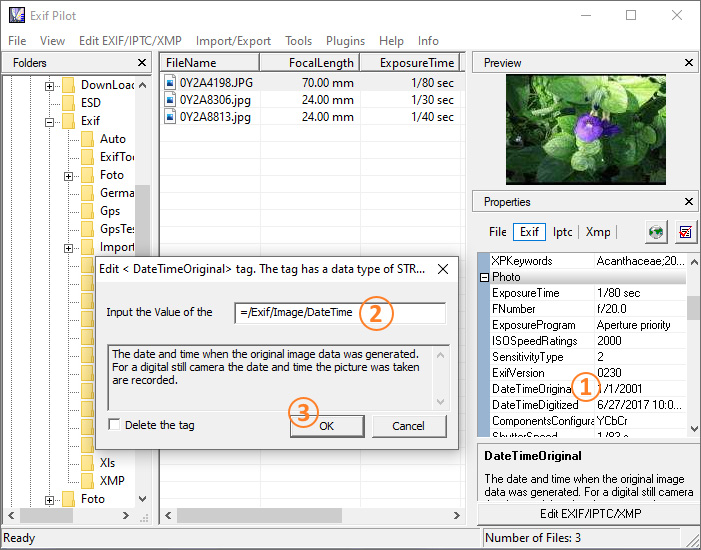
1) In the list of properties, double-click the tag to insert the value in;
2) In the window for entering the value of this tag, type: “=[Source tag name]”, for example: “=/Exif/Image/DateTime”;
3) Click OK to copy the tag value.
If you need to replace tags for a large number of images, click here for instructions…
-
How do I create a <keywords> tag in IPTC data?
To write a tag <keywords> in a file, use Import from XML, MS Excel, or TEXT files. Detailed instructions for creating a <keywords> tag in an image (with Import from XML, MS Excel, or text files) are below.
1) Go to Tools->Options->Settings and uncheck “Export/import to/from single file”.
2) Create a text file containing following lines: “/File/Main/FilePath”, “E:\Work\Projects\EXIF\Samples\Casio.jpg” “/Iptc/Application/Keywords”, “Sample KeyWord”
3) Import the text file you created to chosen images, using “Import/Export-Import EXIF from CSV format…” in the main menu of the program.
-
How to Export EXIF and IPTC data to MS Excel file with Exif Pilot? (At the level of Tag-Names in the table)
Export EXIF/IPTC to MS Excel files:
1) Select the images.
2) Select “Tools’ -> ‘Options’ -> ‘Settings’ and check the ‘Export/import to/from single file’ and ‘Export to MS Excel File (At the level of Tag-Names in the table)’ option.
Select “Tools’ -> ‘Options’ -> ‘Settings’ and check the ‘Export to MS Excel File (At the level of Tag-Names in the table)’ option.
3) Open the ‘Customize export’ tab, choose the data you would like to export and check the ‘Use Template Export’ option.
4) Select “Import/Export”->”Export Exif/Iptc to MS Excel’.
-
Is there any way to get the Orientation field to appear on the report in the file list report in the center pane? Right now that report only shows Filename, FocalLength, ExposureTime, etc.
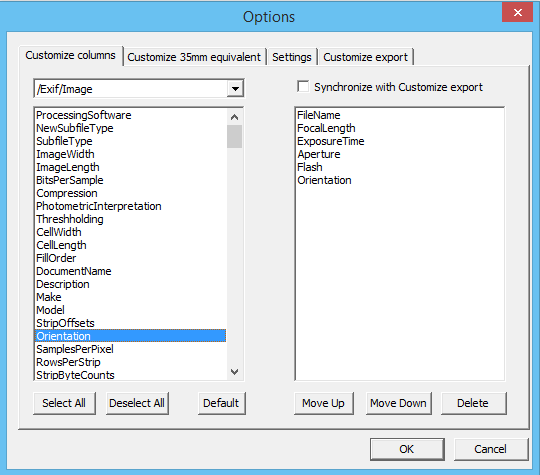
Yes, you have able to customize columns for viewing in the center pane. Go to Tools->Options.. in main menu. On the “Customize columns” tab you can choose columns for view. See attached image.
-
I want a report by tags that allows us to quickly spot which files need updating. Does your batch program do that?
Yes. You can export metadata to XML or text file, where file path and specified tags will be included. And then you can handle this file. See more details here:
- Creating and Editing EXIF and IPTC Using Import from Text File in CSV Format
- Creating and Editing EXIF and IPTC Using Import from XML File
- Creating and Editing EXIF and IPTC using Import from MS Excel
- Customize Export – How to Choose Tags for Export EXIF and IPTC
Also you can sort by specified tag in the center pane.
-
I have 5 000 photos that have no geolocation, but in Excel I have the coordinates of where each photo was taken. Can your software batch update exif data of the 5 000 photos to add GPS location?
Yes, Exif Pilot has feature to batch update data. See more details here. You can import metadata from an Excel file, but the file should be in the specified format that can be parsed by the program. For more details, refer to our page Creating and Editing EXIF and IPTC using Import from MS Excel.
-
When I try to export several tags into an Excel file, all the tags will export. What is wrong?
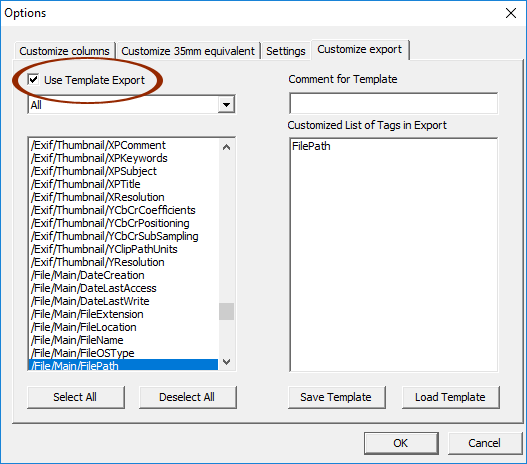
Go to Tools->Options->Customize Export and check “Use Template Export”. Now, only the tags listed under “Customzied List of Tags in Export” will be exported.
See also: How to Choose Tags for Export EXIF and IPTC.
-
I am trying to edit the EXIF GPS. The actual latitude and longitude are: 38.106608, -82.272184. I choose the right references (north and west) and edit the EXIF GPS data. But when I check the properties and details of the image on my computer, I get the values without any references or (-) negative signs, which is actually a totally different location.
The values of the “Exif/GPS/Longitude” and “Exif/GPS/Latitude” tags must be positive. In your case, you need to set the “Exif/GPS/LongitudeRef” tag to “West longitude”. Similarly, if the latitude is negative, you need to set the “Exif/GPS/LatitudeRef” tag to “South latitude”.
-
How to refresh a file folder in order to see new files that have been saved at that location?
To refresh the current folder, press F5.
-
How do I install a new version of Exif Pilot without losing settings?
Please follow our step-by-step instructions to upgrade Exif Pilot without losing the program settings.
-
I have 12,000 JPG images. I also have a TEXT file with all the information for these images: Image Name, Date, Description, & Copyright. I am looking for a convenient way to get this information into the image metafile. I have used your Exif Pilot. It can only do one image at a time. Will your Batch Editing Plug-in allow me to transfer all the information from my TEXT file to my images quickly and easily in a batch mode?
Yes, it is possible. In free Exif Pilot, you can import and export data for a single file. After installing Batch Editing Plug-in, you can select multiple files to import or export the tag values. Please note that processed files must be located in the same directory.
-
I have a .xls file with tags, can I import them to the image(s) using Exif Pilot?
Yes, it is possible. First, make export of metadata from your photos to MS Excel (click here for instructions), to see which format should the metadata have in the table. Then bring the table with the metadata you wish to import into the same format. Note that your table should have only one single spreadsheet called “ExifPilot”, otherwise the import will not work.
-
I want to edit metatags in >1000 images. I decided to batch process them in Excel, so I bought Batch Editing Plug-in. But when I export the metatags I get a separate spreadsheet for each photo. I want one sigle spreadsheet for all photos.
To export/import your metadata to/from a single spreadsheet, please do the following:
1) Go to Exif Pilot menu – Tools – Options…
2) Select the “Settings” tab.
3) Activate the option “Export/Import to/from a single File”.
4) Click “OK”.
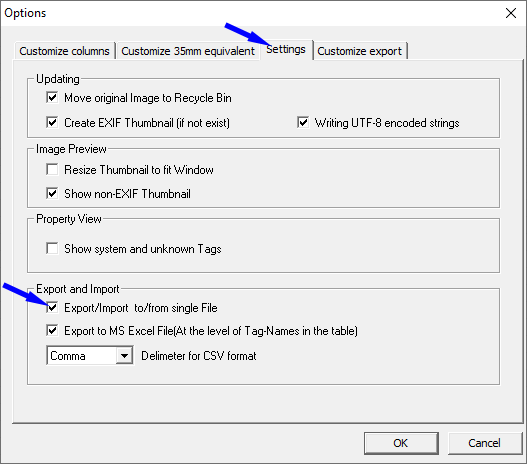
We also recommend that you check the option “Export to MS Excel File (At the level of Tag-Names in the table)” so that you get your exported data as a table.
-
When importing/exporting, the caption (which is really long) is being truncated / cut off.
Export and import of MS Excel data is performed by SQL query to the ODBC Driver.
ExifPilot x32 only works with a 32-bit ODBC Driver, and ExifPilot x64 only works with a 64-bit ODBC Driver.
The 64-bit ODBC Driver has significant limitations, for example, the transmitted strings have a limit of 255 bytes. Unfortunately, we can’t get around this limitation. You can import strings from xls up to 2048 bytes in the x32 version of ExifPilot. However, exporting strings from MS Excel has a limit of 255 bytes for both ExifPilot x32 and x64 versions.
-
The option to Export/Import to/from a single file is greyed out. How can I export exif data from multiple images to a single spreadsheet?
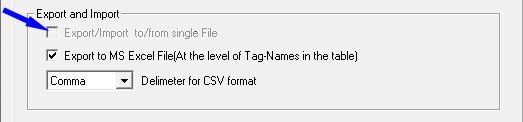
The Export/Import to/from a single file option is activated after installing Batch Editing Plug-in; you can select multiple files to import or export the tag value.
-
Is it possible for Exif Pilot to recognize the metadata I entered in Windows File Explorer? E.g. “Title”, “Comments”, “Subject”…
Yes, it is possible. Windows File Explorer writes the following tags:
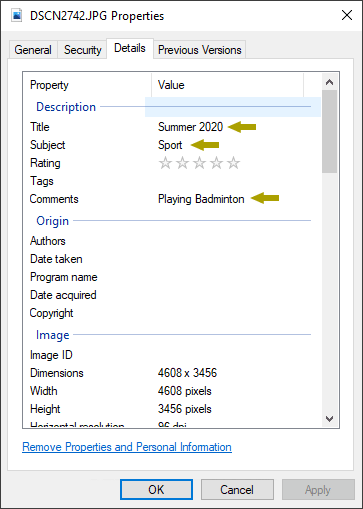
Title
/Exif/Image/Description
/Exif/Image/XPTitle
/Xmp/DublinCore/Title
/Xmp/DublinCore/DescriptionComments
/Exif/Image/XPCommentSubject
/Exif/Image/XPSubjectUsing Exif Pilot & Batch Editing Plug-in, you can batch edit, add or batch remove metadata that is shown in the Properties -> Details window in Windows Explorer.
-
Is it true that EXIF metadata is removed if I send a photo over email (e.g. Gmail) or any social media messenger?
EXIF data is some additional information that is saved in a photo file. If you send a photo as an attachment by email, the photo file will be sent without changes, and the EXIF metadata will remain. If you send a photo via a messenger (for example, WhatsApp, Facebook), it depends on a messenger and its settings.
Since photos can take up a lot of space, messengers try to reduce file size in order to save mobile traffic. A messenger can decrease the size of a photo not only by compressing the photo and reducing its resolution, but also by deleting EXIF data.
Facebook messenger and in fact most social media apps and platforms remove EXIF metadata of any type including GPS data. Only a few platforms support orientation data to display images correctly.
-
I open a folder that contains over 2000 images. After 15 minutes, Exif Pilot has still not read all files names. How can I speed up the process?
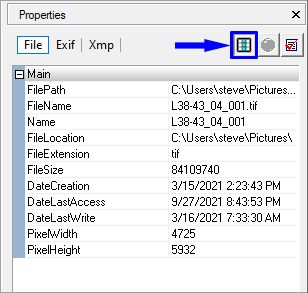
When you open a directory containing a lot of photos, Exif Pilot tries to download it. The contents of each file must be fully loaded into your computer’s memory and analyzed. You can disable the full analysis of all files when loading directory. To do this, click the “Enable/disable loading of Exif files of the current folder” button.
-
I am trying to export EXIF data to MS Excel, I get a dialog box saying “Processing” and nothing happens.
Import and export of XLS is performed by an SQL query to the ODBC driver. This driver is installed with MS Excel and MS Access. These programs are usually sufficient for Exif Pilot x32 version to work.
To export and import to/from MS Excel in Exif Pilot x64 version, you should have x64 versions of MS Excel, MS Access and x64 version of Microsoft Access Database Engine 2010 Redistributable installed on your computer.
-
Will the program work without an always-on internet connection?
Yes, it will. Exif Pilot & Batch Editing Plug-in do not require a constant internet connection.
Didn’t find answer to your question? Feel free to contact us!