
Have a question about Exif Pilot? Check answers to our users’ questions…
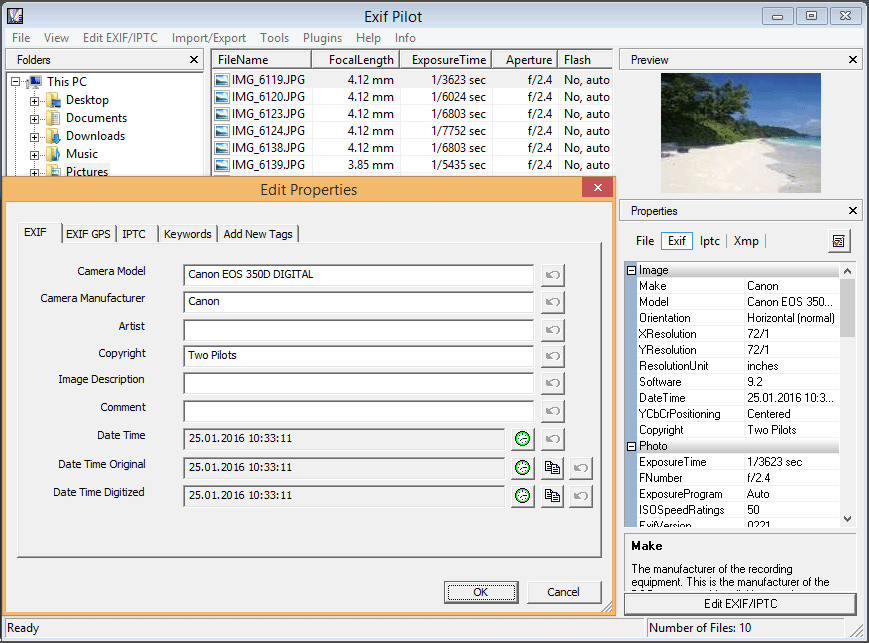
Free features of Exif Pilot:
- View EXIF, EXIF GPS, IPTC, and XMP data. More…
- Edit, create EXIF, EXIF GPS, IPTC, and XMP. More…
- Remove EXIF, IPTC tags, and clean up all metadata. More…
- Add new tags. More…
- Edit some Makernote tags.
- Add, edit, and remove keywords. More…
- Import/export EXIF and IPTC from/to XML files. More…
- Import/export EXIF and IPTC from/to MS Excel files. More…
- Import/export EXIF and IPTC from/to Text files in CSV format. More…
- Choose tags for export. More…
- Edit, create Photo Sphere metadata for panorama images. More…
- View descriptions of fields that contain data.
Paid features of Exif Pilot:
Paid “Batch Editing Plug-in” adds to Exif Pilot editor the ability to bulk change exif. More…
Download free EXIF editor for Windows XP/Vista/7/8/10/11
! PLEASE NOTE THAT THE PROGRAM IS PROVIDED "AS IS", WITHOUT WARRANTY OF ANY KIND. NO UPGRADES ARE PLANNED. NO TECHNICAL SUPPORT IS PROVIDED. BEFORE BUYING THE PROGRAM, CHECK ITS OPERATION AND MAKE SURE THAT IT SUITS YOU COMPLETELY.
- Exif Pilot 6.23.0, x32 bit (4.6 Mb) – basic version.
- Exif Pilot 6.23.0, x64 bit (4.9 Mb) – this version is recommended for exif-processing of large image files (>100 Mb).
x64 bit version: to export and import from/to MS Excel, you should have the following software installed on your computer:- MSExcel x64
- MSAccess x64
- x64 version of Microsoft Access Database Engine 2010 Redistributable
You are welcome to test the newest beta version:
- Exif Pilot 6.25.0 Beta, x32 bit (4.6 Mb)
- Exif Pilot 6.25.0 Beta, x64 bit (4.9 Mb)
New in this beta version:
+ The “Save the value of the DateLastWrite file attribute” setting has been added.
+ The position of the “Enable/disable loading of Exif files of the current folder” button is recorded in the registry.
Feel free to drop us comments about any issues related to the beta versions.
Supported Image Formats
- JPEG, TIFF, PNG, DNG, NEF, PEF, CR2, CRW, JP2, ORF, SRW, ARW, SR2, and PSD – reading, editing, and creating metadata.
- RAW formats, including MRW, RW2, PGF, EPS, and RAF – read-only mode.
How to get started
The workflow is simple: Choose folder with files -> Edit metadata -> Save changes. See our simple guide with screenshots…
Learn more about Exif Pilot
- List of all Tags with description – EXIF, EXIF GPS, XMP, IPTC that Exif Pilot works with…
- Exif Pilot in questions and answers…
- See our video lessons on YouTube…
Paid “Batch Editing Plug-in” adds to Exif Pilot editor the following features:
- Multiple photos processing. More…
- Copying the value of one tag to another within an image for a large number of photos. More…
- Import/export of metadata to a single file or to several separate files. More…
- Command line for editing and creating metadata. More…
Exif Pilot has a specialty that processed files must be located in the same directory.
How to activate “Batch Editing Plug-in” >> How to order >> (Price: 79.95 EUR)
Please note – there are incredibly many parameters that can be written in EXIF. These parameters (tags) can differ depending on camera brand. Exif Pilot can only view tags it knows, and it can change only part of them. If you are about to buy “Batch Editing Plug-in”, please make sure that Exif Pilot can view and edit the tags you need.
| EXIF tasks that can be processed with Exif Pilot | Free features | Paid “Batch Editing Plug-in” |
| View EXIF, EXIF GPS, IPTC, and XMP data | ✔ | ✔ |
| Edit EXIF, EXIF GPS, IPTC, and XMP | ✔ | ✔ |
| Create EXIF, EXIF GPS, IPTC, and XMP | ✔ | ✔ |
| Delete EXIF, EXIF GPS, and IPTC tags, and clean up all metadata | ✔ | ✔ |
| Create, edit, delete image keywords | ✔ | ✔ |
| Edit, create Photo Sphere XMP data | ✔ | ✔ |
| Import/export EXIF and IPTC from/to XML files | ✔ | ✔ |
| Import/export EXIF and IPTC from/to MS Excel files | ✔ | ✔ |
| Import/export EXIF and IPTC from/to Text filesin CSV format | ✔ | ✔ |
| Multiple photos processing | ✔ | |
| Import/export of metadata to a single file or to several separate files | ✔ | |
| Command line for editing and creating metadata | ✔ |
Versions History
March 28 2024 :: Version 6.23.0
+ Added the ability to recursively crawl nested directories to change the values of Exif tags.
Exif Pilot on Facebook
Exif Pilot on YouTube
All Exif Pilot videos on YouTube…
What people are saying about Exif Pilot
“I am delighted with this software. I can’t tell you how much work this program saves for me. Can you imagine how long it would take me to label each and every image one at a time? It took me a couple years working almost everyday to create the spreadsheet with the information on all of my 37K+ slides. Fortunately, I created this spreadsheet years ago when I was still shooting film. Now I am digitizing these old slides (I use the Nikon scanner). Using Exif Pilot, I can now upload all my spreadsheet data into the metadata file on each image rapidly and easily. What a joy; I love this software!”
Rex Johnson
“I carried out tests with the Exif Pilot program, it is a very intuitive and simple to use software. The IPTC and EXIF tag import and export options are very interesting. I decided to purchase the Batch version to be able to speed up operations on a large number of images.These are advantages for me of using the Batch plugin:
– Time saving: the plugin allows you to make changes to multiple image files at the same time, significantly reducing the time needed to make the same changes manually one by one.
– Greater efficiency: thanks to batch editing, you can work in a more efficient and organized way, allowing you to manage large quantities of images more quickly and easily.
– Improved quality of work: the plugin allows you to make consistent and consistent changes across all images, ensuring greater consistency and uniformity in the final result.”
Fabio Lonardo
“As a naturalist, I make lots of slideshows of animals, insects and plants. I put captions on the slides, giving information such as the common and scientific name, the location and the date. EXIF Pilot makes it easy to add the information to EXIF fields. My slideshow pro-gram (PTE) generates the captions from these fields automatically. Many pictures are of the same species, or at the same place. Entering the same data on each individual picture is time consuming and tedious. The Batch Editing plugin speeds the process up and re-sults in fewer random typing errors.”
Michael Berry (UK)
“I supply images to Charities that are important to me, supporting them through my photography. Digital image files have the opportunity to add a layer of securability & traceability by editing the Exif data with such things as Artist/copyright/image description/comment. After trialling different products, I chose Exif Pilot because of the simple logical layout of the Graphical interfaces and image preview thumbnail. Adding Keyword & Tags is equally easier. Having the Batch processing Add-on will save considerable time and help me supply the images promptly.”
Chris Jameson aka @photo_cj
“I am a 77 year young wallpaper junkie. I found Exif Pilot by chance with Google and have been using it to preserve exif tags when I make improvements on the Penguin, Polar Bear or Bird photos I collect.
I try my damnedest to attribute and indicate on each photo the name of the photographer and location. I use Exif Pilot to backup to MSExcel the EXIF and IPTC data before I correct “impurities” on the photos such as camera flash in eyes and worms on beaks. Then I transfer to the corrected image the original EXIF and IPTC data to the corrected one. GREAT TOOL!”
Barbara Ann Ecroyd