
To do color correction, just tell the program which color you want to change and where! We know that the road pavement should look gray. We shall tell Color Pilot that this is a gray color in the image:
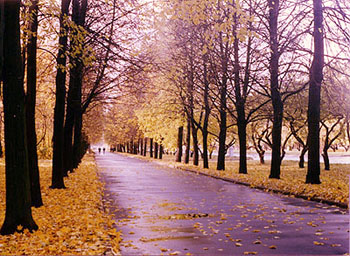
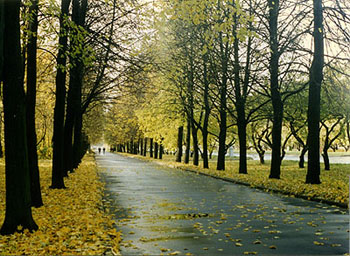
That can be done in only 3 steps:
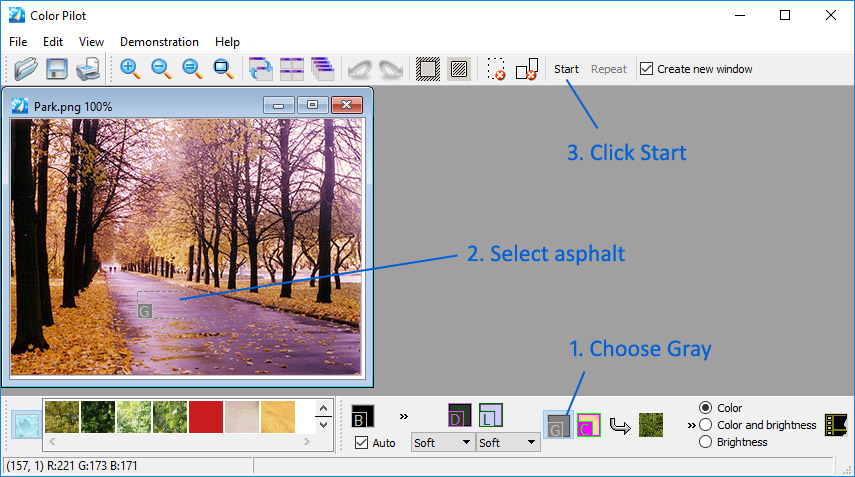
Your first step
After you install the program, just click the Demonstration menu and choose an example to play:
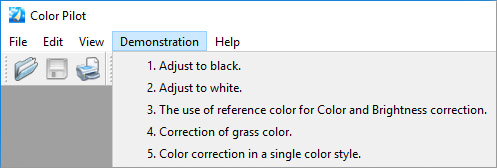
See our step-by-step explanations of each example…
Download
- Color Pilot 5.6.0 (16 Mb) – Windows XP/Vista/7/8/10/11
Limitation of the trial version: the program allows you to save a corrected image of the size up to 1024×1024 pixels.
Ordering information
! PLEASE NOTE THAT THE PROGRAM IS PROVIDED "AS IS", WITHOUT WARRANTY OF ANY KIND. NO UPGRADES ARE PLANNED. NO TECHNICAL SUPPORT IS PROVIDED. BEFORE BUYING THE PROGRAM, CHECK ITS OPERATION AND MAKE SURE THAT IT SUITS YOU COMPLETELY.
Order Color Pilot (29.95 EUR) – use the bought version forever / no subscription required.
The download link & your registration code will be emailed to you as soon as your order is processed (if you didn’t receive the email, please check your spam folder).
Versions History
June 08 2022 :: Version 5.6.0
+ The ability to open multiple photos at once has been added;
+ The documentation has been updated;
+ Added Arabic localization.
What people are saying about Color Pilot
“The result is immediately visible with the reference colors, which is much more time-consuming with other programs. There are programs that automatically set, for example, the white balance, but they are not able to adjust the colors to a shade of my choice. If I want to set several images to the same color, I can do it in a few seconds with Pilot.
A procedure that is probably rarely used by others when I manually colorize black-and-white images. With the majority of manually colored images (especially with automatic colors) it is always can be see that the colors are not real. In such cases, it is enough to find a similar color with Pilot, which can be made perfect with a color, copied from a reference image.”
S Laszlo