

Sound Pilot adds typewriter sounds to your computer keyboard. It creates the romantic sound atmosphere of the time of Remingtons. With every touch of the keyboard, there is a new sound. This makes the process of typing more interesting and intertaining, reduces stress, and helps encourage more rhythmical typing.
By default, Sound Pilot uses the typewriter sound set. However, you may switch to another sound scheme (for instance ICQ or Morse). If your mood changes, with two clicks you can switch your sound scheme, changing the sound aura around you.
Download Free Demo
- Sound Pilot 2.5.1 (6.7 Mb) – Windows XP/Vista/7/8/8.1/10/11
Ordering information
! PLEASE NOTE THAT THE PROGRAM IS PROVIDED "AS IS", WITHOUT WARRANTY OF ANY KIND. NO UPGRADES ARE PLANNED. NO TECHNICAL SUPPORT IS PROVIDED. BEFORE BUYING THE PROGRAM, CHECK ITS OPERATION AND MAKE SURE THAT IT SUITS YOU COMPLETELY.
Order Sound Pilot (29.95 EUR) – use the bought version forever / no subscription required.
The download link & your registration code will be emailed to you as soon as your order is processed (if you didn’t receive the email, please check your spam folder).
Versions History
May 25 2023 :: Version 2.5.1
* Some sound schemes have been improved.
How to use the program
After you install Sound Pilot, you will see the program icon in the System Tray:
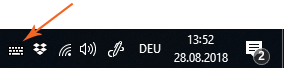
By default, the typewriter sound set is used. To switch to another sound scheme, right-click the program icon and choose a sound scheme from the “Sound Schemes” menu.
To make the program mute, right-click the program icon and click “Mute”:
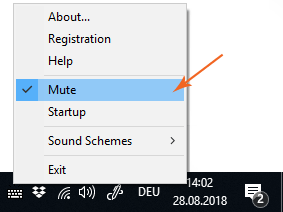
To change the volume, right-click the program icon and click “Sound Schemes | Settings…”
The following sound schemes are provided with the program: Battle, Castanets, Dial-Tone, Erotic, Football, Heretic, Icq, Kin-Dza-Dza, Laser Sable, Morse, Photo, Piano-keys, Pig, Pseudo-Morse, Roundelay, Ruber, Smith-Corona, Stamina, Tap-Dance, Typewriter, Voice-Fast, Voice-Mellow, Voice-Robot, Zoo.
You can also create your own sound schemes by setting different sounds for different buttons on your Keyboard. Read more…