
Home Download Pricing FAQ Manual Tutorials Known issues News
To share the virtual Printer, open Devices and Printers:
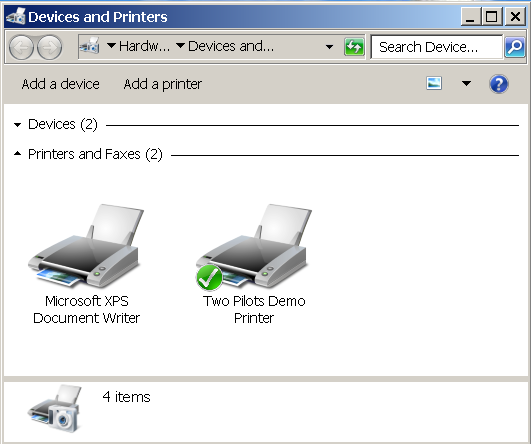
Then right-click, select Printer Properties and select the Sharing tab:
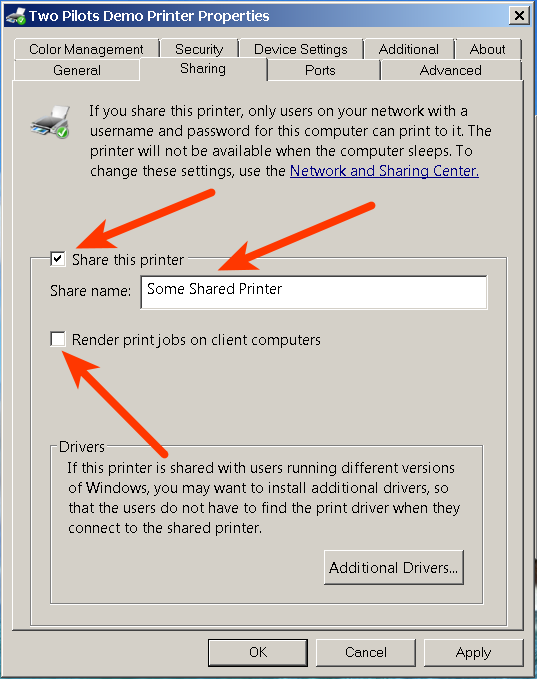
Check Share this printer, enter desired network name for the printer and uncheck the Render print jobs on client computers. Click OK.
Now your shared virtual printer is accessible from a network.
Driver Sharing Options
For domain:
To share a printer in a domain, add Allow domain session in a driver HKLM hive. The Print service will use current logged-in user privileges.
For workgroup:
To share a printer without a password in a workgroup, add Allow guest session in a driver HKLM hive. The Print service will use current logged-in user privileges.
Home Download Pricing FAQ Manual Tutorials Known issues News